
The product sheet — simplified mode
Clicking a product opens its sheet over the list. Simplified mode gets straight to the essentials.
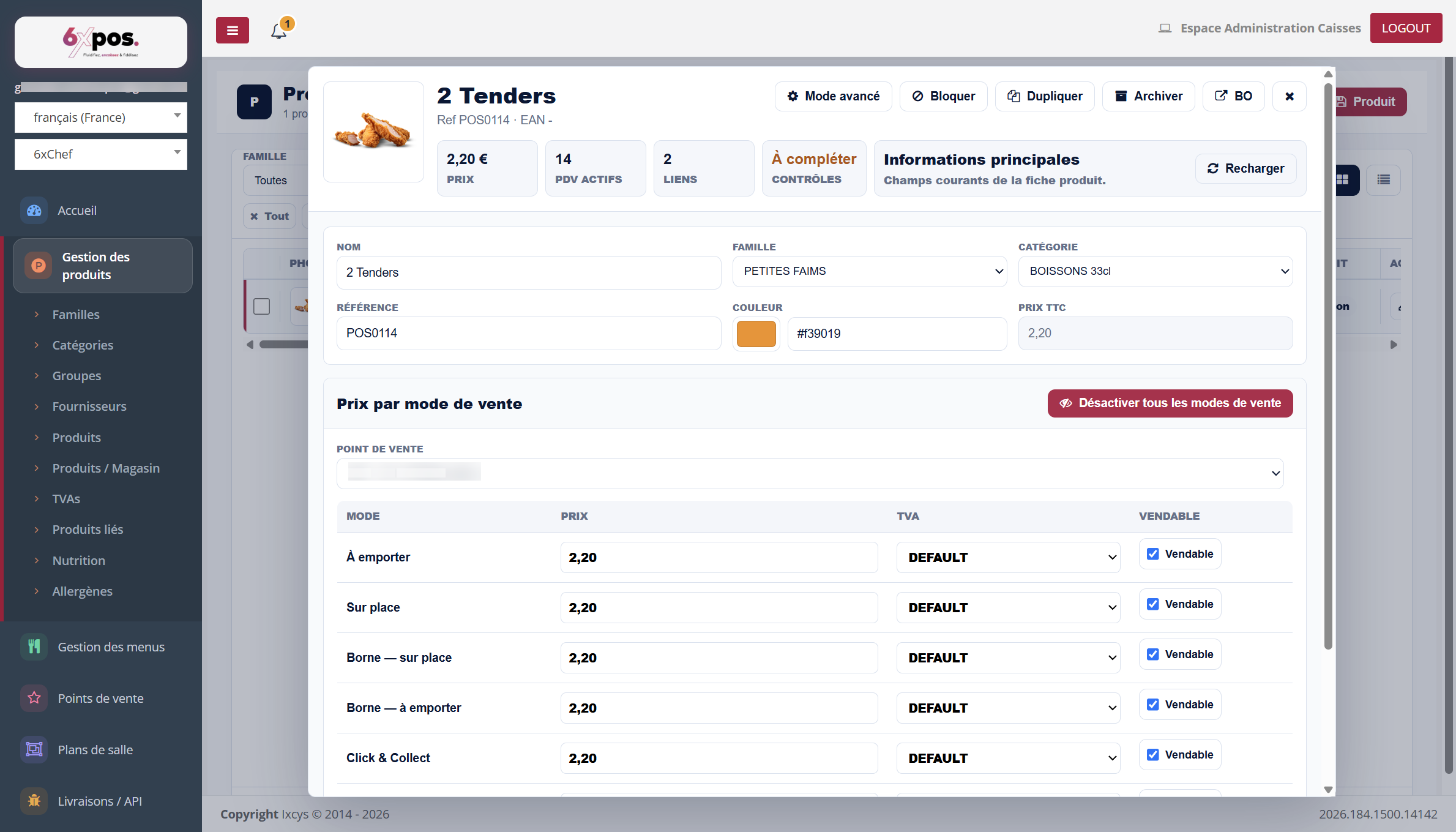
Figure 5 — The simplified sheet: identity, price per sales mode and sellability, POS by POS.
- Header: photo, price, number of active POS, number of links, control status (To complete / To fix), and the "Incomplete online sales info" banner if the name or description of the external channels is missing.
- Main information: name, family, category, reference, colour (dot on the till screens), price incl. tax.
- Price per sales mode: for the POS selected in the picker: one line per mode — Dine-in, Takeaway, Kiosk — dine-in, Kiosk — takeaway, Click & Collect, Delivery… — with price, VAT (DEFAULT = default VAT) and Sellable checkbox.
- Header buttons: Block, Duplicate, Archive, BO (opens the legacy sheet), Close. "Disable all sales modes" cuts off sale of the product everywhere.
Good to know — a product has a price PER SALES MODE and PER POS. The same product can be €2.20 for dine-in and a different rate for delivery, varying from one point of sale to another.
Good to know — "sellable" is decided at three levels: the sheet's global switch, the checkbox for the POS × mode pair, and a filled-in price. A product invisible at the till is usually missing one of the three.